
Free Snagit Alternatives for Mac and Windows
Free Snagit alternatives: ShareX and Greenshot for Windows, Shottr for Mac, Flameshot and PixPin for both. Snagit now costs $39 a year, subscription only.
Read more

SMBAct is one window manager for three operating systems: Windows, macOS and Linux. From the keyboard it puts a window into a half, a third or a quarter of the screen. Its window switcher finds any open window by a few typed letters.
The number we would rather skip is zero. That's the count of free plans. SMBAct starts with a trial that has every feature on, and after the trial it wants a license. Rectangle, a window manager for the Mac, costs nothing and publishes its source.
On one Mac, free wins.
The case for SMBAct starts at the second computer. People keep typing "Rectangle for Windows" into search boxes, and the query has one honest answer: no such build exists. Rectangle is a Mac app. Our page on Rectangle for Windows lists what does the same job on Windows and Linux, with one drawback per option, ours included. SMBAct is the one entry on that list that runs on all three systems.
A window manager is the software that decides where each window sits, how big it is and which one is in front. Every desktop has one. Linux treats it as a part with a name that anyone can swap: i3, Sway, KWin. Windows and macOS build theirs in and lock the door.
On a Mac or a Windows PC, "window manager" is a generous name for a smaller thing. Rectangle, Magnet, FancyZones and SMBAct replace nothing. They add shortcuts and snap zones on top of the manager the system already has.
A "window manager" on a Mac isn't a manager. It's a set of shortcuts with a settings page.
The category splits in two. Tiling window managers place every window on their own, side by side with no overlap, and a config file sets the rules. Snapping tools move one window on command and touch nothing else. SMBAct belongs to the second kind.
Press a shortcut, and the focused window takes a preset place: a half, a third, a quarter, a sixth or an eighth of the screen. Press the same shortcut again, and the window steps through the nearby sizes. Other shortcuts maximize a window, center it, restore it or send it to the next monitor.
On supported desktops the mouse reaches the same layouts. Drag a window to a screen edge or a corner, and it drops into a half, a quarter or a third. The feature starts switched off. The systems snap dragged windows on their own, and SMBAct asks before it takes that job over.
Nobody keeps dozens of shortcuts in their head. A search popup takes names instead: type part of a layout's name and skip the keys.
A shortcut nobody remembers isn't a feature. It's a line in a manual.
Alt+Tab is a kitchen drawer. Finding one spoon means touching all of them. The Mac has it worse. Cmd+Tab isn't a window switcher. It's an app switcher, and five browser windows count as one icon.
We press the switcher shortcut on a Windows desktop with seven windows open. A grid of previews comes up under a field that says "Search windows". We type three letters of a title, and the grid shrinks to the tiles that match. Enter, and that window is in front.
The search is fuzzy and reads window titles and app names, so part of a name is enough.
Alt+Tab doesn't take a name. The switcher does.
The same grid minimizes a window, closes it or sends it to full screen. On two or three monitors the switcher opens on the active display, on the main one or on the one under the pointer. Apps on the excluded list stay out of the grid and out of reach of every shortcut. Where a desktop hands over no snapshot of a window, the tile shows the app's icon.
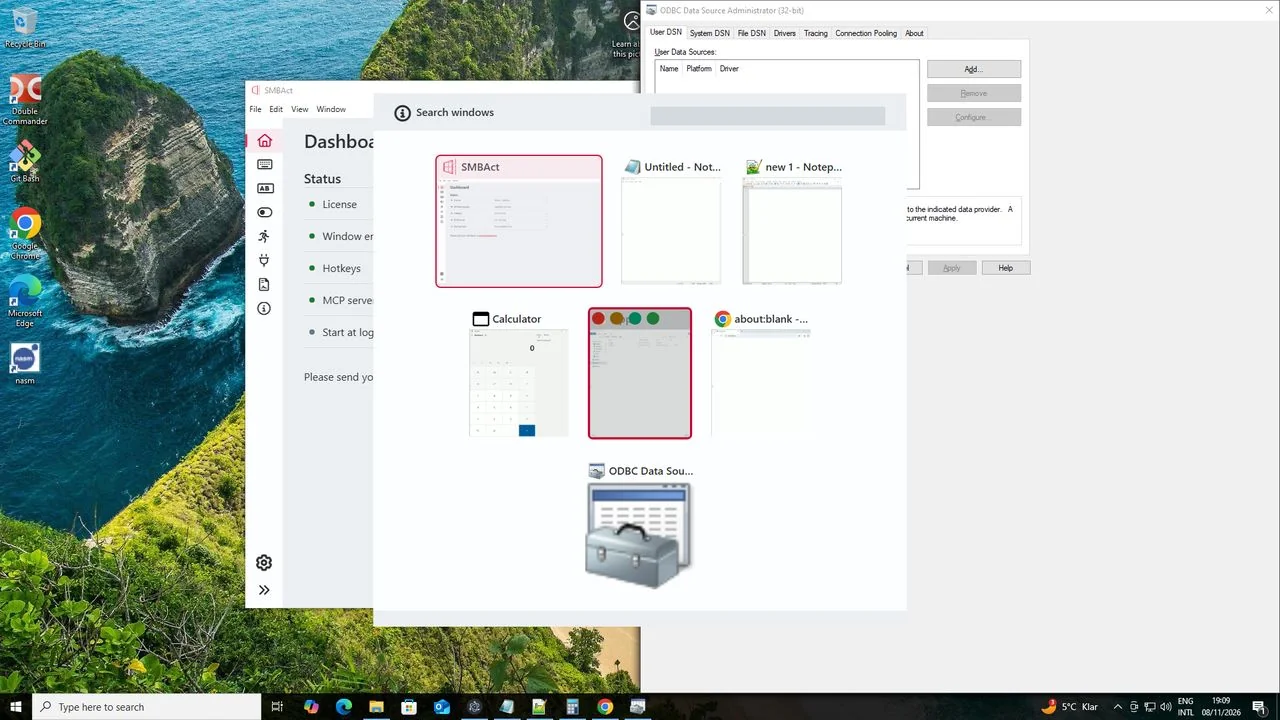
The SMBAct switcher on Windows: seven open windows in one grid, with the "Search windows" field on top. Typing narrows the grid.
One app covers three systems, and each system brings a different neighbor.
Windows. Windows ships Snap, and Microsoft's free PowerToys adds FancyZones, an editor for drawing custom zones and dragging windows into them. SMBAct draws no zones. As a window manager for Windows it serves the keyboard: preset sizes smaller than a half, a switcher, and the same keys on the next machine. Zone fans on a Mac hit the mirror problem, because PowerToys runs on Windows alone. Our rundown of FancyZones alternatives covers the Mac and Linux side.
Mac. The Mac window manager shelf is full. Rectangle is free, and Magnet is a small one-time buy in the Mac App Store. Is SMBAct the best window manager for Mac? For one Mac and plain snapping, no. Rectangle does that for nothing. SMBAct earns its license in two cases: a window switcher in the same app, or a second computer on another system. We wrote both head-to-heads ourselves and kept the "No" rows in our own column: SMBAct vs Rectangle and SMBAct vs Magnet.
Linux. A "window manager for Linux" is a different job: i3, Sway, Hyprland. Those replace the desktop's own manager and tile everything. SMBAct replaces nothing. It runs on top of GNOME, KDE Plasma and X11 desktops, under Wayland too on the first two, and brings the same layouts and the same switcher as on Windows and the Mac.
Hands learn one set of keys. Three window managers on three computers ask for three.
SMBAct carries a server for AI agents inside the app. Through the MCP server, Claude Code, Cursor, Codex and other MCP clients list the open windows, put them into layouts, move them between monitors and bring one to the front. "Editor on the left two thirds, terminal on the right" turns into a few tool calls.
The server ships off. Once on, it listens on 127.0.0.1 and nowhere else, asks each client for an access token by default and has a switch for each kind of action. Closing windows stays off until its own switch goes on, and SMBAct can ask before every close. An agent with these tools moves windows. It doesn't type, click, launch apps or read what a window shows.
Free agent skills on GitHub teach an agent the manners: list the windows first, leave its own terminal alone, ask before closing. Tool calls need the trial or a license, like the shortcuts do.
A window tool for agents needs more brakes than features.
Three kinds of people should skip it.
We keep the source closed as well, and every comparison we write says so.
The trial runs with every feature on. After it SMBAct needs a license, a one-time purchase, and the pricing section holds the current numbers. We keep them off this page on purpose. A price in a blog post goes stale. A pricing page doesn't.
A trial isn't a free tier. It's a deadline.
The license ignores the operating system. A three-device license covers any mix of Windows, macOS and Linux: a Mac, a Windows PC and a Linux laptop at once.
SMBlob is part of GigLabo, so the license lives in a GigLabo account, next to the downloads. The builds come from releases.giglabo.com, and the download page offers the one for the current system: installers for Windows, builds for Apple Silicon and Intel Macs, an AppImage and an rpm for Linux.
What is SMBAct? SMBAct is a window manager and window switcher for Windows, macOS and Linux. From the keyboard it moves a window into a half, a third, a quarter or an eighth of the screen and sends it to another monitor. Its switcher finds any open window by fuzzy search in a grid of previews.
Is SMBAct free? No. SMBAct has a trial with full functionality and no free tier. After the trial it needs a license. The pricing section on smblob.com holds the current price and the trial length.
Is there Rectangle for Windows? No. Rectangle is a macOS app with no Windows or Linux build. On Windows the options are the built-in Snap, PowerToys FancyZones and SMBAct. SMBAct runs on macOS and Linux too, with the same layouts.
Is SMBAct a tiling window manager? No. A tiling window manager arranges every window on its own. SMBAct moves one window on command and leaves the rest alone. For automatic tiling on Windows, look at komorebi or GlazeWM.
What is the best window manager for Mac? For plain snapping on one Mac, Rectangle. It costs nothing and its source is open. SMBAct fits a Mac user who also wants a window switcher with search, or who works on Windows or Linux as well and wants one app on every computer.
Can an AI agent arrange my windows with SMBAct? Yes. SMBAct has a local MCP server for Claude Code, Cursor, Codex and other MCP clients. The server is off by default, listens on 127.0.0.1 only, asks for an access token by default and has per-tool switches. Tool calls need the trial or a license.
SMBAct is a set of keyboard layouts and a window switcher that behave the same on Windows, macOS and Linux, with a guarded door for AI agents. If you live on one Mac and want plain snapping, take Rectangle and keep the money. If your hands move between systems, or Alt+Tab has stopped keeping up, the trial costs you a deadline and nothing else.
The SMBAct window manager runs on Windows, macOS and Linux, with a full-feature trial before the license.
Free Snagit alternatives: ShareX and Greenshot for Windows, Shottr for Mac, Flameshot and PixPin for both. Snagit now costs $39 a year, subscription only.

Xnapper is Mac-only, with no Windows build. We compare Shots.so, Pika, CleanShot X and Heretic Lazy Shot on platform, price and one honest drawback each.

CleanShot X has no Windows version. The alternatives: ShareX, Greenshot and PixPin free, Snagit at $39 a year, Lazy Shot at €14.99 once. CleanShot costs $35.